Why was my API message charged for more SMS than I expected?
Hidden line breaks, code indentation and special characters push messages past 160 characters. Check with the portal counter or sandbox=true.
If an API message cost two (or more) SMS when you expected one, it almost always went over 160 characters because of characters you can’t see: line breaks, spaces from code indentation, or special characters that count double. The quickest way to find out is to paste the exact text into the Send SMS page in the portal, or send it with sandbox=true, which shows exactly how it will be counted and charged without sending anything.
How messages are counted
- Standard text fits 160 characters in one SMS. Above that, it’s split into parts of 153 characters, and each part is charged.
- Emoji, macrons and other non-standard characters switch the whole message to Unicode, with only 70 characters per SMS (67 per part). This only applies if Unicode is enabled on your account and you send
unicode=true; otherwise they’re converted to plain text. - Every recipient is charged separately, so one extra segment on a 1,000-person send is 1,000 extra SMS.
More detail: How SMS length, segments and emoji affect cost.
The usual suspects
| Cause | What happens | Fix |
|---|---|---|
| Line breaks | Every line break is a character. A blank line between paragraphs is 2. | Use single line breaks, or none, in short messages. |
Windows line breaks (\r\n) | Each line break counts as 2 characters instead of 1. | Convert to \n before sending, e.g. str_replace("\r\n", "\n", $body). |
| Indentation in code | A multi-line string written inside indented code keeps the leading spaces on every line, which can add dozens of characters you never see. | Build the message without indentation, or trim each line. |
| Tabs | Tab characters (common when text is copied from spreadsheets or code) are sent as a space. Each one still uses a character. | Replace tabs with a single space, or remove them. |
| Leading and trailing whitespace | Templates often end with a newline or spaces. | Trim the body before sending. |
| Double-escaped line breaks | Sending the two characters \n literally (backslash + n) instead of a real line break. It shows on the phone as “\n”, and the backslash counts as 2, so each one costs 3. | Check your JSON or URL encoding isn’t escaping twice. |
| Characters that count double | [ ] { } \ ~ ^ | and € each use 2 characters in standard text. | Avoid them, or allow for them in your length limit. |
| Merged-in data | Names, addresses, links and dates make some messages longer than your test one. | Test with your longest real values, not “Sam”. |
Check 1: paste it into the portal
- Copy the exact text your system sends, ideally from your logs, not from your template.
- Paste it into the Message box on the Send SMS page. You don’t need to send it.
- Read the counter under the box: characters used, the encoding (GSM-7 or Unicode) and the number of SMS segments.
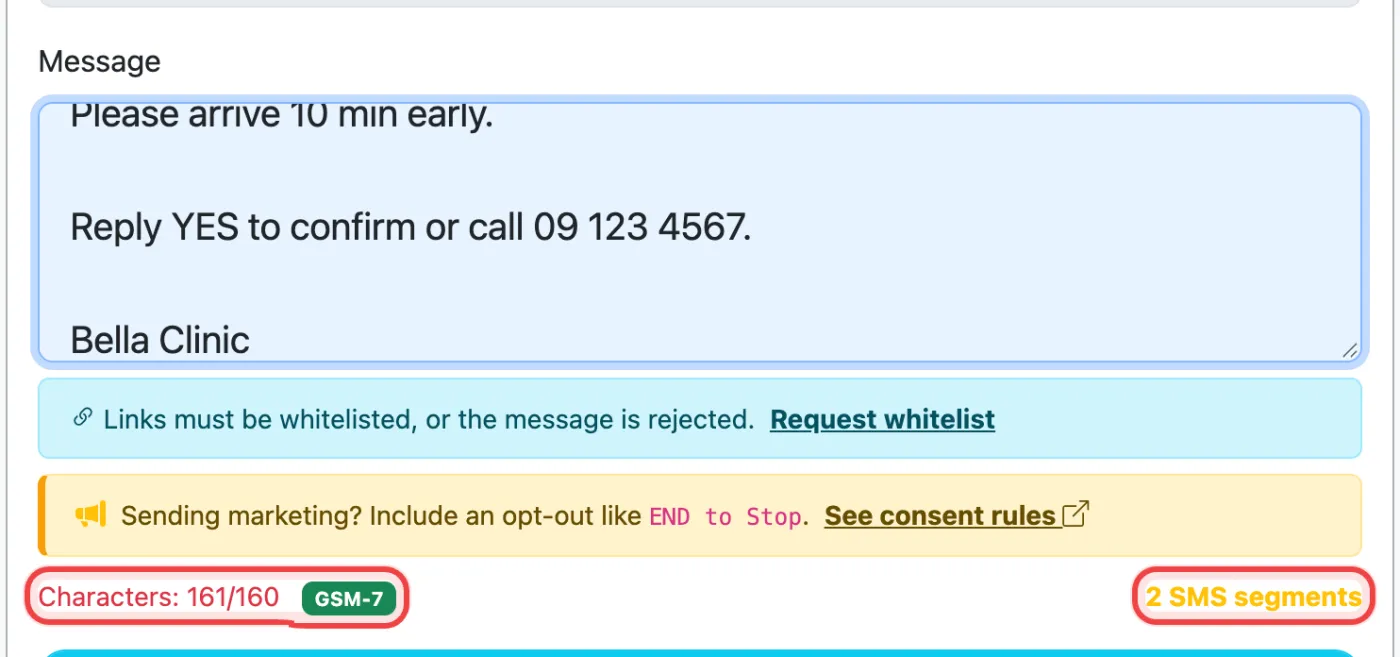
The portal shows every line break as 1 character. If your system sends Windows \r\n line breaks, the API counts 2 for each, so the sandbox check below is the exact answer for what your code sends.
Check 2: send it with the sandbox
Add sandbox=true to the same request your code makes. Nothing is sent or charged, and the response shows exactly how WebSMS sees your message:
curl -X POST https://api.websms.co.nz/api/connexus/sms/out \
  -H "Authorization: Bearer YOUR_ACCESS_TOKEN" \
  -d "to=6421234567" \
  --data-urlencode "body@message.txt" \
  -d "sandbox=true"
{
"status": "sandbox",
"parts": 2,
"sandbox_encoding": "GSM-7",
"sandbox_would_charge": 0.23,
"sandbox_message": "Hi Sam,\n\nYour appointment..."
}partsis the number of SMS segments you’ll be charged per recipient.sandbox_encodingshowsGSM-7(160 per SMS) orUCS-2(Unicode, 70 per SMS).sandbox_would_chargeis the cost for that message including GST.sandbox_messageis the body as received. Look for stray\r, spaces or literal backslashes.
Tip: Every real send also returns parts in its response. Log it next to your own message ID, and you’ll spot an unexpectedly long template the first time it happens, not on your invoice.
Cap the length
To make sure a message never costs more than you expect, send fragmentationLimit (1–11). For example, fragmentationLimit=1 trims anything longer to fit one SMS. The response then includes truncated: true and the original length, so you can fix the template.
Still doesn’t add up?
Check Transactions in the portal for the charge, then contact support with the message ID (message_id from the response) and we’ll show you exactly how it was counted.
Related articles
More in API & Integrations
We’re a small New Zealand team and happy to help.