Send your first SMS with the WebSMS API
Create API credentials, get an access token, send a test and a real SMS with curl, and check delivery - in about five minutes.
The WebSMS API lets your website, app or system send texts automatically, for things like booking confirmations, passcodes and alerts. This guide takes you from zero to your first sent message in about five minutes: create API credentials, get an access token, send a message and check it was delivered.
You’ll need: a WebSMS account with some credit, and a way to make HTTP requests. The examples use curl, which works in any terminal. Full reference: API documentation and the OpenAPI explorer.
1. Create your API credentials
- Open API Keys. Click your name in the top-right corner, then API Keys.
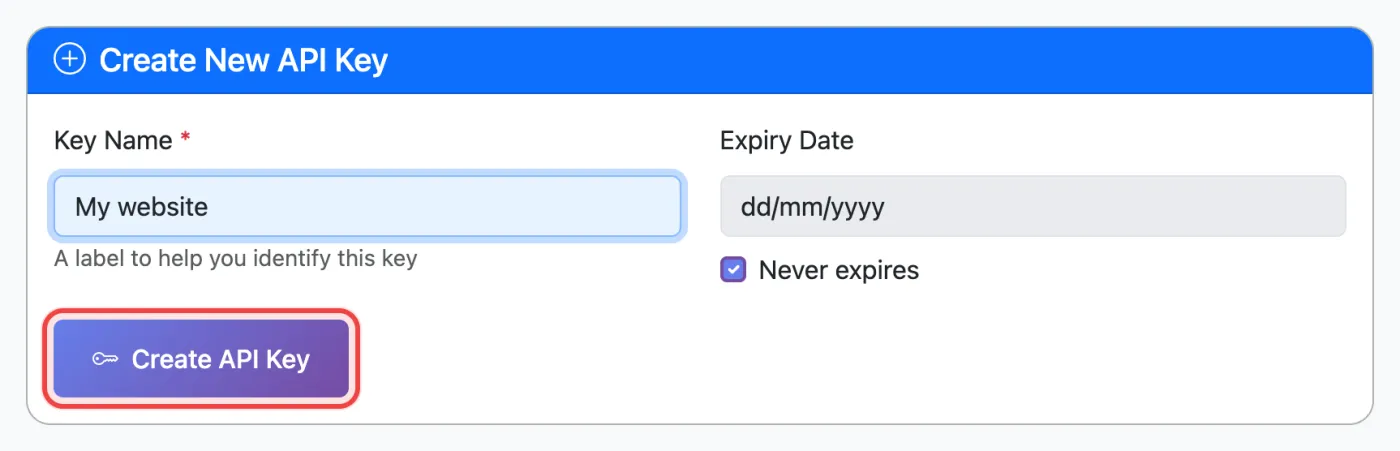
- Name the key after where it will be used, e.g.
My website, then click Create API Key. - Copy both values now. You’ll see a Client ID (starts with
cid_) and a Client Secret (starts withcsk_). The secret is shown only once, so store it in your app’s secret settings or password manager.
Keep the secret secret. Never put it in website JavaScript, a mobile app or a public code repository. Call the API from your server. If a secret leaks, click Regenerate Secret on that key, which immediately cancels the old one.
2. Get an access token
Swap your Client ID and Secret for an access token. A token lasts 24 hours, so get a new one when it expires rather than for every message.
curl -X POST https://api.websms.co.nz/api/connexus/auth/token \
  -d "client_id=YOUR_CLIENT_ID" \
  -d "client_secret=YOUR_CLIENT_SECRET"
Response:
{"access_token":"wst_...","token_type":"Bearer","expires_in":86400}3. Try a test send (sandbox)
Add sandbox=true to check your request without sending anything or spending credit. The response tells you the encoding, how many segments the message uses and what it would cost.
curl -X POST https://api.websms.co.nz/api/connexus/sms/out \
  -H "Authorization: Bearer YOUR_ACCESS_TOKEN" \
  -d "to=6421234567" \
  -d "body=Hi Sam, your booking is confirmed for 10am tomorrow." \
  -d "messageClass=transactional" \
  -d "sandbox=true"
4. Send your first real SMS
Remove sandbox=true and use your own mobile number for the first send:
curl -X POST https://api.websms.co.nz/api/connexus/sms/out \
  -H "Authorization: Bearer YOUR_ACCESS_TOKEN" \
  -d "to=6421234567" \
  -d "body=Hi Sam, your booking is confirmed for 10am tomorrow." \
  -d "messageClass=transactional" \
  -d "messageId=booking-1042"
A successful send returns HTTP 200:
{"success":true,"status":"accepted","message_id":1188236,"to":"6421234567","from":"2190","parts":1}| Field | What to send |
|---|---|
to | Mobile number in international format without +, e.g. 6421234567. A leading 0 is treated as an NZ number. |
body | Message text. Up to 160 characters is one SMS; longer messages are split into 153-character parts, up to 11 parts. |
messageClass | transactional or marketing. See which one applies. |
messageId | Optional. Your own reference (up to 36 characters), returned in status checks and webhooks. |
from | Optional. Your dedicated shortcode, if you have one. Leave it out to use the shared shortcode. |
5. Check it was delivered
curl -X POST https://api.websms.co.nz/api/connexus/sms/status/query \
  -H "Authorization: Bearer YOUR_ACCESS_TOKEN" \
  -d "message_id=1188236"
The status will be DELIVRD once the phone has received it. Other values include ACCEPTD/PENDING (on its way), UNDELIV/FAILED (not delivered) and BLOCKED. See what each delivery status means.
Rather than polling, set a Webhook URL on the API Keys page. WebSMS will then POST delivery receipts (type: "dlr") and incoming replies (type: "SMS") to your server as they happen.
Common first-send problems
| Response | What it means | Fix |
|---|---|---|
| 401 Invalid or expired token | The token is wrong or more than 24 hours old | Request a new token (step 2) |
| 403 Insufficient funds | Not enough credit for the message | Add funds |
422 url_not_whitelisted | The message contains a link that isn’t approved. It was rejected and a small fee charged. | Get the domain whitelisted, then resend |
429 duplicate_loop_protection | The same message was sent to the same number more than 3 times in 10 minutes | Check your code isn’t retrying in a loop. Nothing was sent or charged. |
429 recipient_rate_limit | More than 15 messages to one number in an hour | Slow down, or ask support about your use case |
| 400 Destination country not permitted | Your account restricts which countries you can send to | Update Allowed Destination Countries on the API Keys page |
A 200 isn’t always delivered. If the recipient has opted out, or the number is invalid, the request still returns success but the message is BLOCKED. Always use the status query or your webhook to confirm delivery. See opted-out numbers.
Good to know
- Night-time hold: transactional messages to NZ numbers submitted between 11pm and 7am NZ time are queued and sent at 7am (response
status: "queued"). Passcodes sent through the OTP endpoint (sms/otp) are exempt. See night-time sending and 24/7 exemptions. - Bulk: send a JSON body with
toas an array to message up to 200 numbers in one request. - Using a framework or no-code tool? There’s a Laravel package, ready-made integrations for Zapier, Make, HubSpot and more, and an MCP server for AI assistants.
- Sending one-time passcodes? See OTP SMS for NZ, which has code samples.
Related articles
- Why was my API message charged for more SMS than I expected?
- Turn on two-factor authentication, recommended for any account with API keys
- How message length affects cost
- What the delivery statuses mean
- Bulk SMS gateway and API
More in API & Integrations
We’re a small New Zealand team and happy to help.