How to find opted-out numbers and remove them from your groups
See who has replied STOP or END, spot opted-out numbers still in your contact groups, and prune them in one click to save money.
When someone replies STOP, END or a similar keyword, their number is blocked for your account and won’t receive any more messages from you. It stays in your contact groups, though. The Blocked page shows every opted-out number, flags the ones still in your groups, and removes them in one click.
Why prune opted-out numbers?
- It saves money. Messages to opted-out numbers aren’t delivered, but they’re still counted in the cost of each send.
- Your numbers stay accurate. Recipient counts and cost estimates reflect people who can actually receive your messages.
- It’s easier to stay compliant. Exported lists, or lists you use elsewhere, won’t include people who asked you to stop.
See who has opted out
- Open Messages. Click Messages in the top menu.
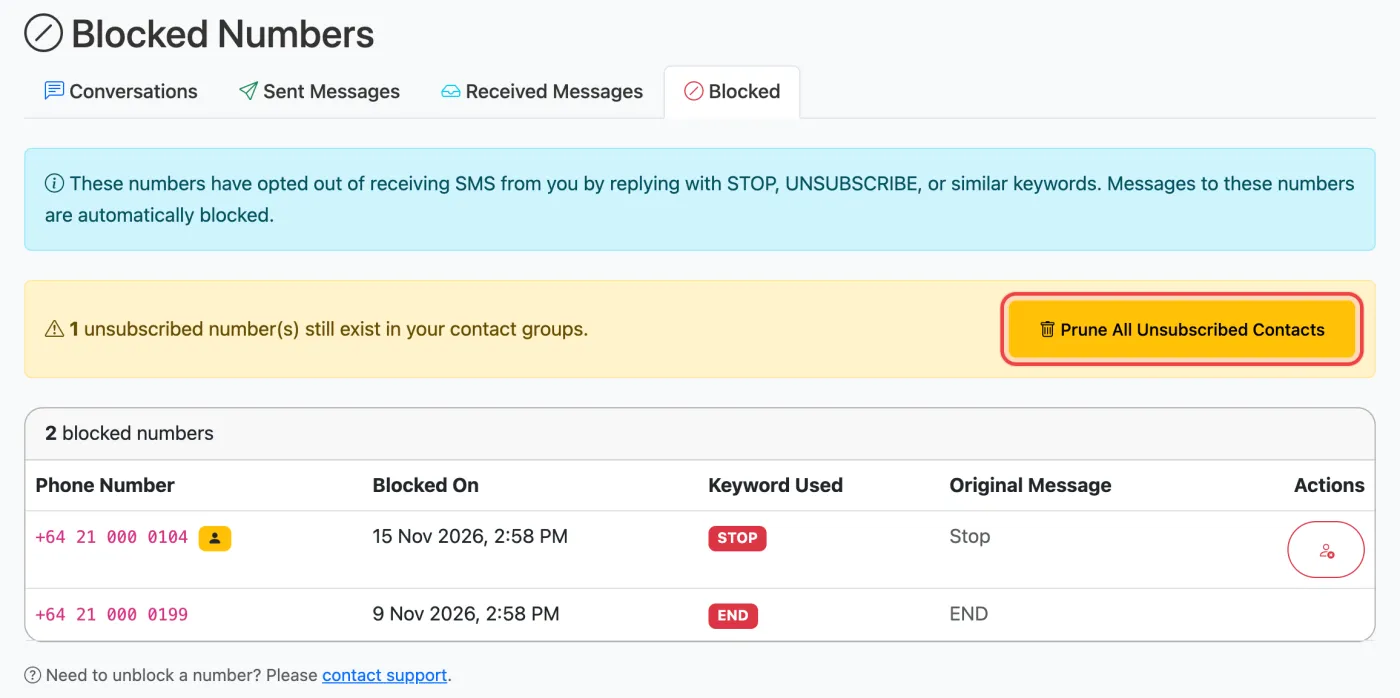
- Click the Blocked tab. You’ll see each blocked number, when it opted out, the keyword it used and the original reply.
- Look for the yellow person badge. A badge next to a number means it’s still in one or more of your contact groups.
Remove them from your groups
All at once
If any opted-out numbers are still in your groups, a yellow banner shows how many. Click Prune All Unsubscribed Contacts and confirm. Every opted-out number is removed from all your groups. The block itself stays in place.
One number
Click the red person icon in the Actions column to remove just that number from all your groups.
Pruning can’t be undone, but nothing important is lost: the person has asked not to be contacted, and their opt-out stays on record either way.
Do it after every import
Importing a spreadsheet doesn’t check opt-outs, so an old customer list can put opted-out people back into a group. Make it a habit: import, then prune. See Create a contact group and send a group text.
Can I unblock a number?
Only if the person has clearly asked to receive your messages again, for example by opting back in. Unblocking is done by our team so there’s a record of it. Contact support with the number and how they re-subscribed.
Common questions
Does an opt-out apply to all my messages?
Yes. Opt-outs apply to your whole account, whichever number you send from and whether you use the website or the API.
What if someone replies “stop” by accident?
They’re blocked like anyone else. If they confirm they want messages again, contact support to unblock them.
I use the API. How do I know a number is blocked?
The send request still returns success, but the message status comes back as BLOCKED with the reason unsubscribed, in the status query and your delivery webhook. The API also has an unsubscribes/query endpoint for syncing opt-outs into your own system. See Send your first SMS with the API.
Related articles
More in Contacts & Groups
We’re a small New Zealand team and happy to help.